Introduction
This is a guide to evolve a simple architecture to a scalable architecture in AWS. We will explain the core concepts behind this design and evolve a simple architecture step by step.
What is the three-tier architecture?
The 3-Tier Architecture is a well-established pattern for building scalable and resilient web applications. It separates the system into three logical layers, each with a distinct responsibility:
- Presentation Tier (Front End): The entry point for users. It typically includes web servers, content delivery networks (CDNs), and static content storage. All user interactions begin here.
- Application Tier (Back End): The processing layer that handles business logic and data orchestration. It hosts application servers, microservices, and application code, bridging the presentation and data tiers.
- Data Tier (Database): The persistence layer responsible for storing and managing application data. It encompasses databases, data storage solutions, and data processing services consumed by the application tier.
This separation of concerns is the core strength of the pattern — each tier can be managed, scaled, and updated independently, which leads to better maintainability, flexibility, and availability.
By adopting this architecture, organizations can build robust web applications on AWS that handle varying workloads without sacrificing reliability.
ELB - Load Balancer
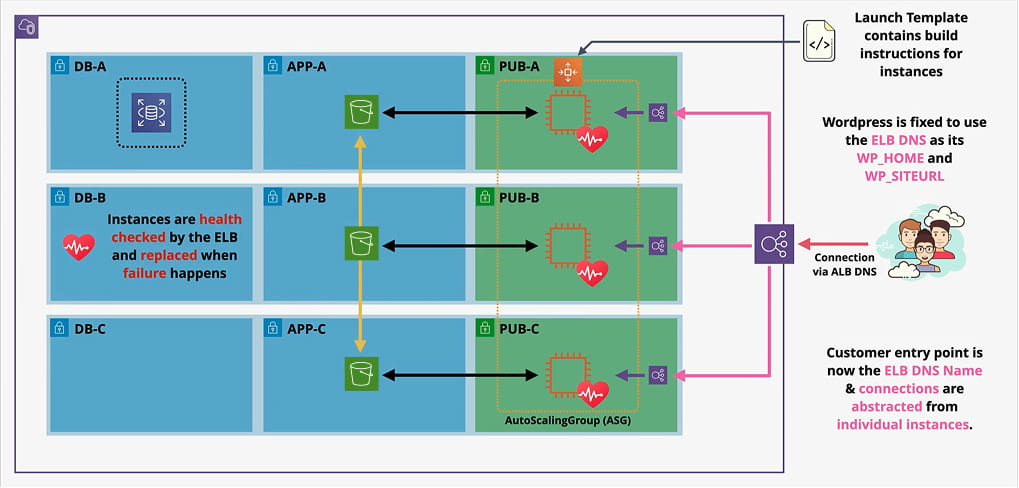
This is the key to make the application scalable and high available. ELB is a load balancer that distributes traffic across the application's instances. It is responsible for routing traffic to different instances of the application. If we didn’t have Load Balancers in each layer, everything would be tied (connected to specific instances) and highly coupled.
[WEB Tier]Users will connect to Load Balancers and forget about EC2 Instances.[APP Tier]EC2 Instances from Web Tier will connect to load balancers from APP Tier and forget about EC2 Instances in app tier
Load Balancers allow each tier to scale independently.
Evolving a simple architecture to a scalable and high available architecture
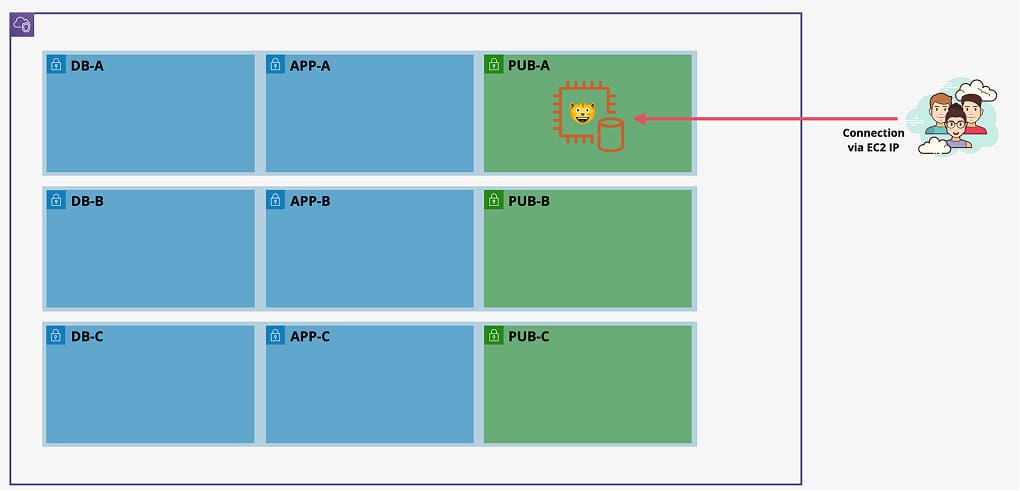
The architecture will start with a manually built single instance, running the application and database over the stages of the demo you will evolve this until its a scalable and resilient architecture
Step 1: Single instance
- Here we will start with a single instance, running the application and database on the same instance.
- We can configure SSM Parameters to store the application and database configuration.
Downsides of this solution:
- Application and database are highly coupled (using same instance) preventing their independent scaling
- Application media is stored locally on the instance and this means again any scaling events in or out risks this media
- Customer connection are directly to an instance which prevents us from doing any form of scaling or automatic-healing or health-checks
- Slow and annoying manual installation process very prone to errors.
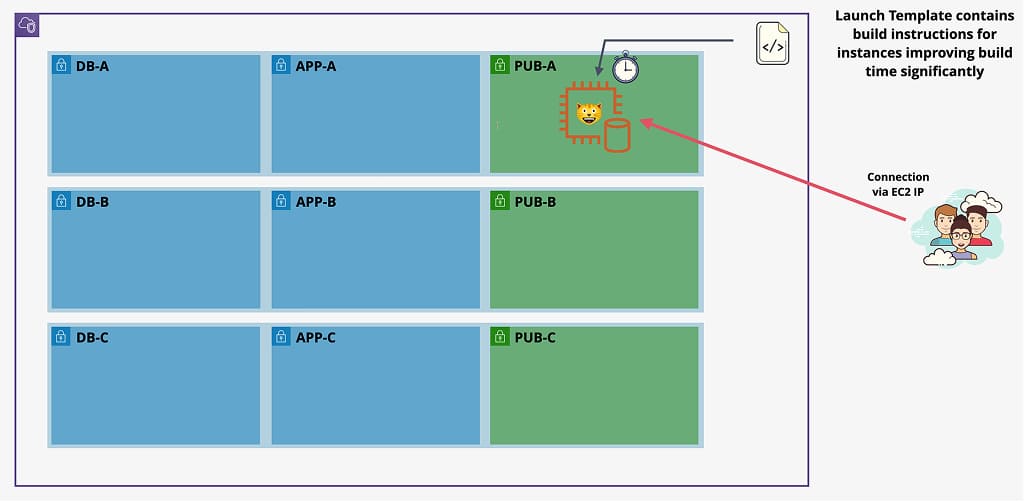
Step 2: Automate using a Launch Template
- Here we will use a Launch Template to automate the creation of the instance. LT allow us to create a new instance with the same configuration.
- The architecture will still use the single instance for both the app and database, the only change will be an automatic build rather than manual build.
Downsides of this solution:
The application and database are built manually, taking time and not allowing automationFIXED- The database and application are on the same instance, neither can scale without the other
- The database of the application is on an instance, scaling IN/OUT risks this media
- The application media and UI store is local to an instance, scaling IN/OUT risks this media
- Customer Connections are to an instance directly ... no health checks/auto healing
- The IP of the instance is hardcoded into the database ...
Step 3: Separate Database from Application
- In stage 3 you will be splitting out the database functionality from the EC2 instance .. running to an RDS instance or Aurora instance.
- This will allow the DB and Instance to scale independently, and will allow the data to be secure past the lifetime of the EC2 instance.
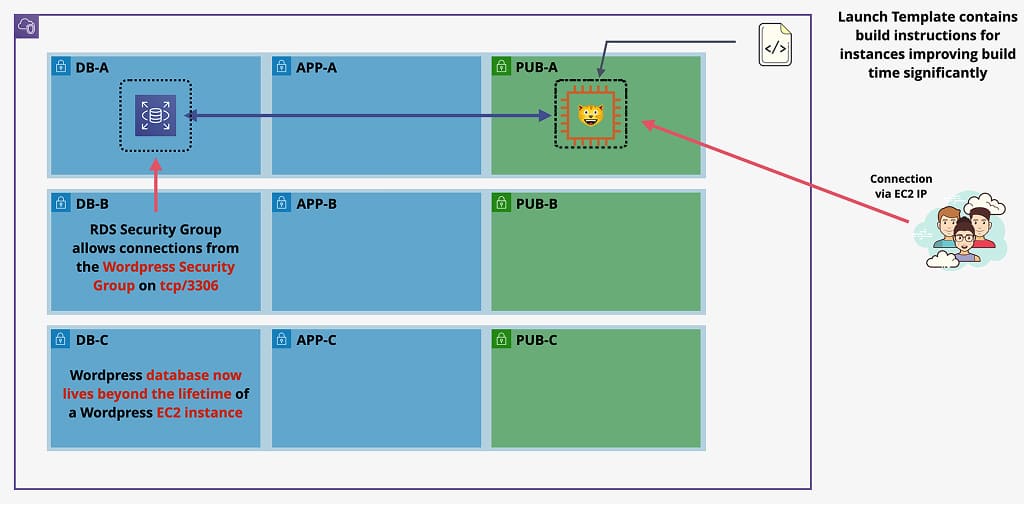
Downsides of this solution:
The application and database are built manually, taking time and not allowing automationFIXEDThe database and application are on the same instance, neither can scale without the otherFIXEDThe database of the application is on an instance, scaling IN/OUT risks this mediaFIXED- The application media and UI store is local to an instance, scaling IN/OUT risks this media
- Customer Connections are to an instance directly ... no health checks/auto healing
- The IP of the instance is hardcoded into the database ....
Step 4: Separate Storing Media from Instance
- In stage 4 you will be splitting out the media storage from the EC2 instance .. running S3 to an S3 instance.
- By storing this on a shared storage like S3 it means that the data can be used across all instances in a consistent way, and it lives on past the lifetime of the instance.
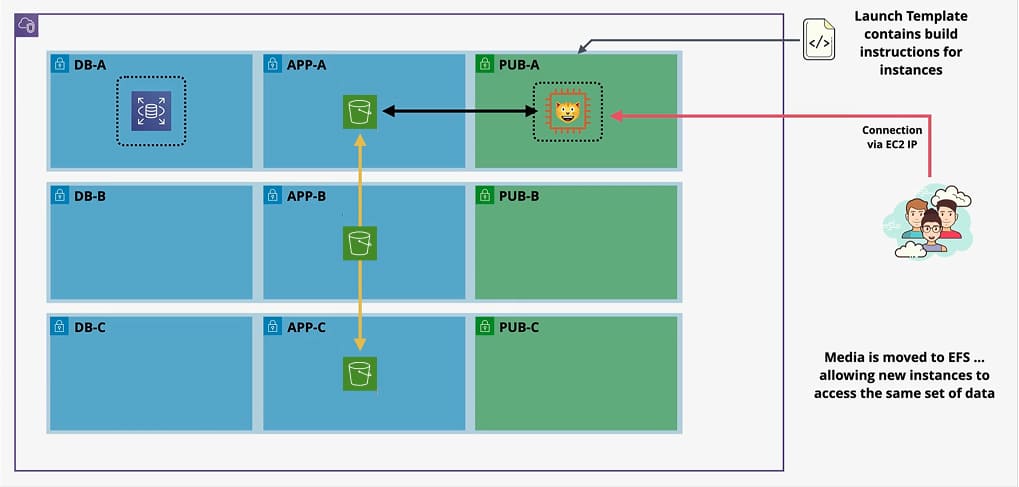
Downsides of this solution:
The application and database are built manually, taking time and not allowing automationFIXEDThe database and application are on the same instance, neither can scale without the otherFIXEDThe database of the application is on an instance, scaling IN/OUT risks this mediaFIXEDThe application media and UI store is local to an instance, scaling IN/OUT risks this mediaFIXED- Customer Connections are to an instance directly ... no health checks/auto healing
- The IP of the instance is hardcoded into the database ....
Step 5: Adding Load Balancer & Auto-scaling group
- We will be adding an auto scaling group to provision and terminate instances automatically based on load on the system.
- We have already performed all of the preparation steps required, by moving data storage onto RDS, media storage onto S3 and creating a launch template to automatically build the wordpress application servers.
Downsides of this solution:
The application and database are built manually, taking time and not allowing automationFIXEDThe database and application are on the same instance, neither can scale without the otherFIXEDThe database of the application is on an instance, scaling IN/OUT risks this mediaFIXEDThe application media and UI store is local to an instance, scaling IN/OUT risks this mediaFIXEDCustomer Connections are to an instance directly ... no health checks/auto healingFIXEDThe IP of the instance is hardcoded into the databaseFIXED
Conclusion
Evolving from a single-instance setup to a fully distributed, multi-tier architecture is not just a technical exercise — it reflects how production-grade applications are built and operated at scale.
By progressively separating concerns across each step, we addressed every major weakness of the original design:
- Independent scaling: Decoupling the database (RDS), media storage (S3), and application layer (EC2 + ASG) means each component can grow or shrink based on its own demand, without affecting the others.
- High availability: Load Balancers distribute traffic across multiple instances, eliminating single points of failure and enabling automatic health checks and self-healing.
- Resilience: Storing data in managed services like RDS and S3 ensures it persists beyond the lifetime of any individual instance, protecting against data loss during scaling events.
- Automation and consistency: Launch Templates remove the risk of manual configuration errors, making instance provisioning fast, repeatable, and reliable.
This pattern is the foundation of most modern cloud architectures on AWS. Once you understand the reasoning behind each layer, you can apply these same principles to any application — regardless of its stack or scale.